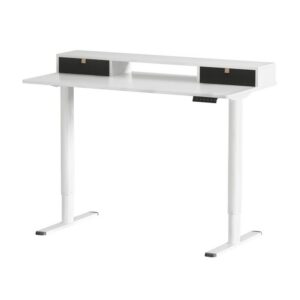

When people configure a sit-stand desk, they usually agonise over the motor, the colour and the frame, then pause on the one question that actually shapes how the desk feels every day: what size? Our Design Your Desk configurator offers two widths, 120cm and 140cm, and the right choice comes down to your space and how you work. Here’s how to decide.
Measure your space first
Before anything else, measure the wall or nook where the desk will live, both width and depth, and note anything that limits it: a door that swings in, a window sill, a heater, a walkway you need to keep clear. A desk that’s 20cm too wide for the space is a daily annoyance; one that fits properly disappears into the room.
As a rule of thumb, leave a little breathing room either side rather than filling the wall exactly. It makes cable management and cleaning far easier.
120cm: compact and single-monitor friendly
A 120cm top is the right call when:
- You run a laptop, or a single monitor plus a laptop.
- Your space is tighter: a spare-room corner, a bedroom nook, an apartment.
- You like a minimal, uncluttered surface.
It comfortably fits a monitor, keyboard, mouse and a notebook with room to write, and it’s the more affordable option, starting from $298.90.
140cm: room for dual monitors and spread
Step up to a 140cm top when:
- You run, or plan to run, dual monitors or a wide ultrawide screen.
- You like to spread out: documents, a second device, a coffee and a notebook, all at once.
- You have the wall space and want the desk to feel generous.
The extra 20cm makes a real difference for dual-screen setups. You get the screens plus working space in front of them, rather than a cramped surface.
What actually changes with size (and what doesn’t)
A common question: does the whole desk get bigger, or just the frame? With our configurable sit-stand combo, choosing 120cm or 140cm changes the tabletop — you get a genuinely wider top — while the electric frame is adjustable to suit. In other words you’re buying more desk, not the same top on a longer frame. Frame colour (black or white) and tabletop colour (black, white, walnut, white oak or rustic brown) are separate choices that don’t change the footprint.
Build yours
The easiest way to decide is to use the Design Your Desk configurator: pick your size, then your frame and tabletop colour, and watch the price update as you go. If you’re still unsure, measure your space and start with the size that leaves a little room to spare. You rarely regret the desk that fits.
Frequently asked questions
Can I fit dual monitors on a 120cm desk? Two 24-inch monitors will fit, but it’s tight. If dual screens are your plan, 140cm is the more comfortable choice.
How much room do I need behind the desk for standing? None extra. A sit-stand desk rises straight up, so its footprint is the same whether you’re sitting or standing.
Ready to configure? Head to Design Your Desk and build your sit-stand combo: 120cm from $298.90, 140cm from $357.90, with free shipping on orders over $150.